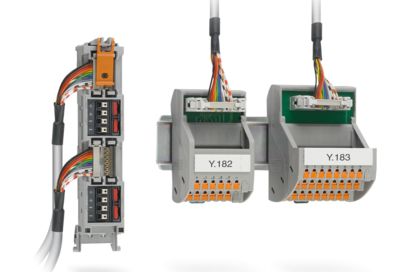
- Detach the old ET 200M/S7-300 front adapter with the existing field cabling
- Remove the old controller


With the VARIOFACE PLC/DCS migration portfolio, you can migrate I/O signals quickly and easily from an old to a new I/O system via plug-and-play. Maintaining the existing field wiring enables seamless integration, minimizes wiring errors, reduces the number of loop checks, and cuts downtime. This increases the efficiency and reliability of your system.

Migration cable including SIEMENS terminal block type K0 for upgrading from Siemens SIMATIC® S7-300/ET 200M to Siemens SIMATIC® ET 200SP HA (for 2-level solution with rack). 6ES7322-1HH01-0AA0 to 6DL1132-6HD50-0PK0 conversion, cable length: 0.6 m

Migration adapter, controller: Upgrade from Siemens SIMATIC® S7-300/ET 200M to Siemens SIMATIC® ET 200SP HA, connection 1: D-SUB pin strip 1x 37-position, connection 2: Spade connection 20-position (2,8 x 0,8), connection 3: Push-in connection 2x 2-position
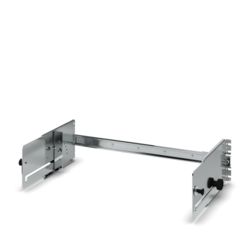
Mounting rack for converting from Siemens SIMATIC® S7-300/ET 200M to Siemens SIMATIC® ET 200SP HA in an existing control cabinet. The mounting rack offers a rotatable installation level that facilitates access to the rear level. Overall width: 620 mm

Migration cable including SIEMENS terminal block type K0 for upgrading from Siemens SIMATIC® S7-300/ET 200M to Siemens SIMATIC® ET 200SP HA (for 2-level solution with rack). 6ES7321-1FH00-0AA0 to 6DL1131-6GF00-0PK0 conversion, cable length: 0.6 m

Migration adapter, controller: Upgrade from Siemens SIMATIC® S7-300/ET 200M to Siemens SIMATIC® ET 200SP HA, connection 1: D-SUB pin strip 1x 37-position, connection 2: Spade connection 20-position (2,8 x 0,8), connection 3: Push-in connection 2x 2-position

Mounting rack for converting from Siemens SIMATIC® S7-300/ET 200M to Siemens SIMATIC® ET 200SP HA in an existing control cabinet. The mounting rack offers a rotatable installation level that facilitates access to the rear level. Overall width: 483 mm
Migration adapter, controller: Upgrade from Siemens SIMATIC® S7-300/ET 200M to Siemens SIMATIC® ET 200SP HA, connection 1: D-SUB pin strip 1x 37-position, connection 2: Spade connection 40-position (2,8 x 0,8), connection 3: Push-in connection 2x 2-position
Migration adapter, controller: Upgrade from Siemens SIMATIC® S7-300/ET 200M to Siemens SIMATIC® ET 200SP HA, connection 1: D-SUB pin strip 1x 37-position, connection 2: Spade connection 20-position (2,8 x 0,8), connection 3: Push-in connection 2x 2-position

Migration adapter, controller: Upgrade from Siemens SIMATIC® S7-300/ET 200M to Siemens SIMATIC® ET 200SP HA, connection 1: Push-in connection 2x 10-position, connection 2: Spade connection 20-position (2,8 x 0,8)

Migration cable including SIEMENS terminal block type K0 for upgrading from Siemens SIMATIC® S7-300/ET 200M to Siemens SIMATIC® ET 200SP HA (for 2-level solution with rack). 6ES7321-1FF01-0AA0 to 6DL1131-6GF00-0PK0 conversion, cable length: 0.6 m

Using the VARIOFACE Migration Solution, you can quickly migrate I/O signals from ET 200M/S7-300 to ET 200SP HA via plug-and-play. The existing field wiring is retained. This reduces wiring errors, loop checks, and downtime, resulting in greater efficiency and reliability.


The robust mounting rack enables a space-neutral upgrade without the need to modify the control cabinet. The continued use of the existing DIN rail drill holes and the wired ET 200M/S7-300 front connectors ensures short setup times. The pull-out and tilt mechanism with locking function in 15° increments ensures good access and prevents collisions with other fixtures.


Migration made easy: If you are already using system cabling from Phoenix Contact, all you need to do to switch to your new SIMATIC® ET 200SP HA is to replace the system cables.
Your field wiring remains untouched: Old cables out, new cables in, and production can continue quickly.

Step 1:
Step 2: