clipx ENGINEER assemble Release Notes 1.3
This document describes the most important changes between versions 1.3 and 1.2.1 of the clipx ENGINEER assemble software from Phoenix Contact (CLIPX ENGINEER ASSEMBLE - Software-Add-on - 1662166 | Phoenix Contact).
The following new features have been added:
Workbench screen
With version 1.3, clipx ENGINEER assemble introduces an optional Workbench screen to create a more realistic workstation layout.
The screen can be added via the Edit Rack dialog and allows configuration of its position and width. The width is defined in workbench-bin units and enables flexible adaptation to the physical setup. The screen is always placed in the lower row and can be removed at any time.
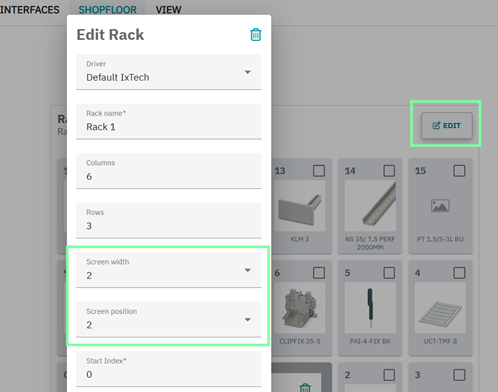
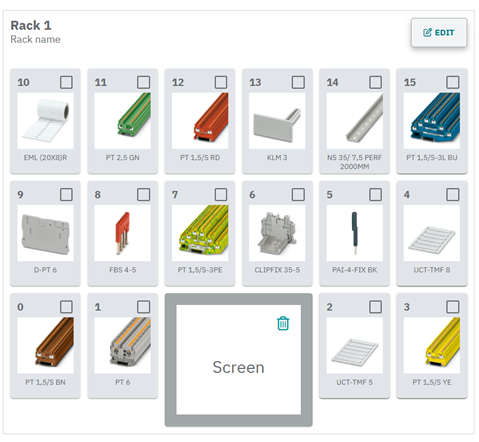
This feature improves the visual representation of the workstation and supports a more realistic simulation of production environments.
Make Pick-By-Light driver optional
The Pick-By-Light driver is now optional. Systems that do not use Pick-By-Light hardware no longer require the installation of the corresponding driver.
This provides greater flexibility when setting up workstations and simplifies deployment in environments without Pick-By-Light systems.
Display of zero-cut measurements
Zero-cut measurements are now displayed directly within the production workflow.
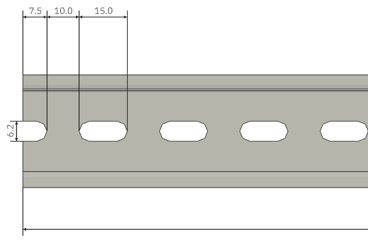
The information is shown in the Prepare / Cut a rail step and is enabled by default. This ensures consistent visibility of machining data and helps operators perform cutting operations more accurately.
This enhancement improves transparency and reduces ambiguity during the production process.
Enhancement of pre-assemble functionality
The pre-assemble workflow has been improved by introducing a new filter for CLXM, CLX, and CLM items.
This filter is available in the Place instruction filter settings and allows users to focus specifically on relevant pre-assembled components during production.
As a result, the workflow becomes clearer and more efficient, especially for complex assemblies.
Support of endless bridges
Endless bridges are now fully supported within the assembly workflow.
They are placed in the correct order and consistently visualized throughout the production process, ensuring a reliable and predictable assembly sequence.
Workflow improvements
Several usability improvements have been implemented to optimize daily operations:
- The Workstation button has been redesigned for improved visibility.
- Enter key navigation allows users to move between steps without using a mouse.
- Rack magazine items retain a fixed position across sessions.
Fixes
With version 1.3, several issues have been resolved to improve stability and reliability:
- Improved handling of rack imports, preventing duplicates, and invalid configurations.
- Correct display of article names imported from JSON files.
- Optimized element highlighting and layout behavior in the workstation view.
- Improved rendering of label content during printing.
- Correct handling of uncut rails in the production flow.
- Extended support for all newly added item types.
These fixes ensure a more stable and consistent user experience.
Security
This release includes significant improvements in security and system stability.
All known vulnerabilities have been resolved, and underlying software components have been updated to their latest secure versions.