5.9.6Routing table
The routing table can be used to specify via which gateway and interface a specified IP address or IP address range can be reached by the controller. The table contains both the routes created automatically by the Linux system and the manually added routes.
Note that domain name resolution restrictions can apply and possibly not all network interfaces can be used in parallel if using DNS servers that are not equivalent.
Figure 5-28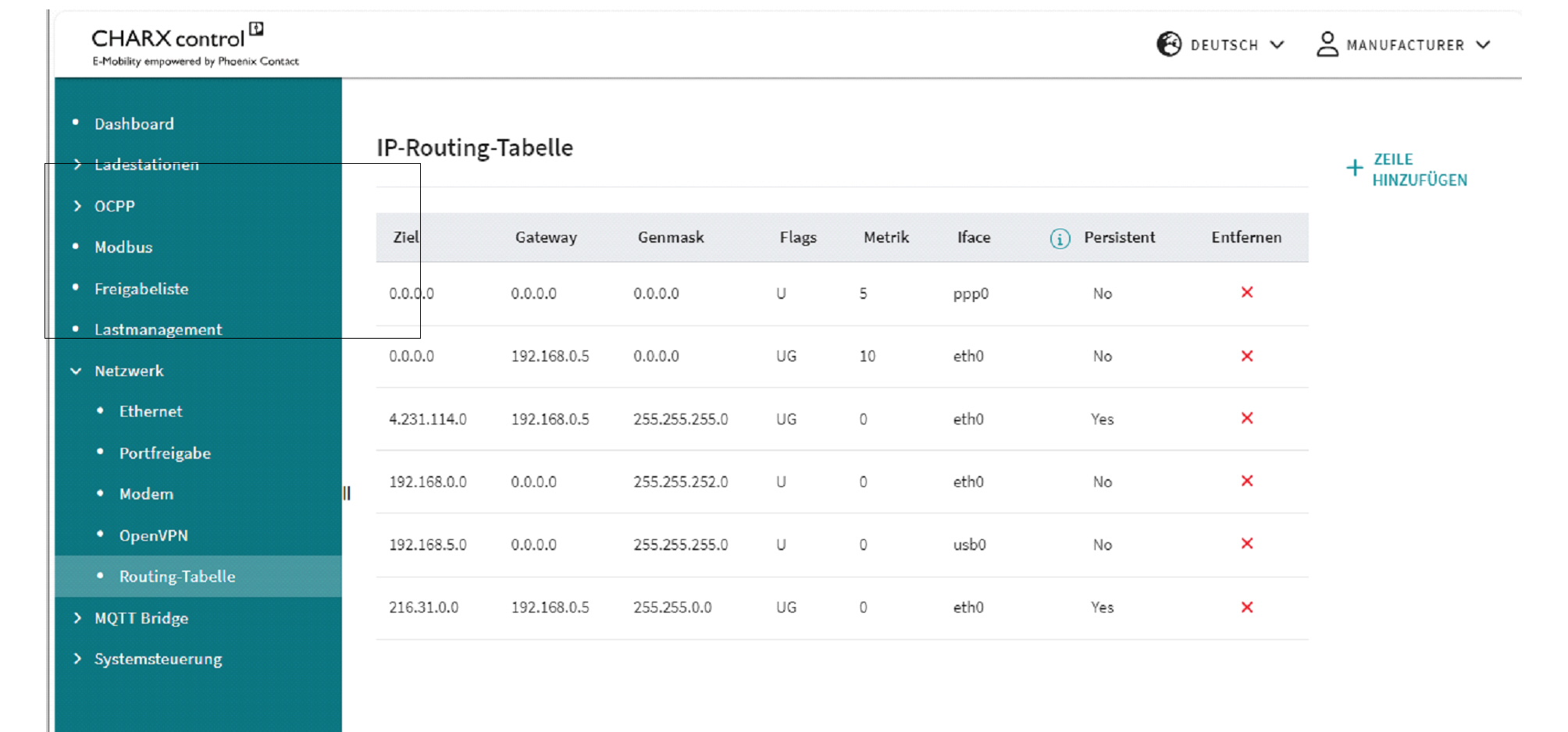 Routing Table
Routing Table | |
|---|---|
Destination | IP address in the destination network |
Gateway | Gateway via which the destination network is to be reached |
Genmask | Subnet mask for the destination network |
Flags | U: Up route is valid G: Gateway – the route leads to a gateway router and not to a directly connected network or host H: Host name – the route leads to a host and not to a network, where the destination address is a complete address R: Reject – is set by ARP when an entry expires (e.g., because the IP address could not be resolved into a MAC address) D: Dynamic – route added by a route redirection or RIP (if “routed” is activated) M: Modified – route changed by a route redirection C: Cloning – a new route is cloned by this entry when it is used L: Link – information at connection level, e.g., the Ethernet MAC address, is available S: Static route added with the route command |
Metric | Specifies the preference for a route (smaller metric = higher preference) |
Iface | Physical interface via which the gateway is to be addressed: eth0: Ethernet interface THH0 ppp0: Cellular interface usb0: USB interface |
Persistent | Route is permanently stored |
Remove | Button for removing an IP route |
Add Row | Button to open an input mask for creating a new route |
Adding a routing rule
Figure 5-29Adding routing rules
IP Routing Table - Add Rule | |
|---|---|
Network | Input field for the IP destination address for which the route is to be used in IPv4/subnet mask format (e.g., subnet mask “/32” = 255.255.255, “/24” = 255.255.255.0) In order to also be able to route IPv4 destination addresses that are not static, it can make sense to mask the rear area of the destination address. Pay attention to any conflicts with other destination addresses and create additional routing rules for this, if necessary. |
Gateway | Input field for the gateway via which the destination network is to be reached |
Interface | Selection field for available network interfaces |
Metric | Input field for the preference for the route, 0 = highest preference |
Persist | Selection field to determine whether a routing rule is retained after the restart |
APPLY | Created routing rule is accepted and applied |
CANCEL | Created routing rule is not accepted |
Removing a routing rule
IP routes can be deleted via the “Remove” icon. The deletion of persistent routes is confirmed via the pop-up window.
Figure 5-30Removing routing rules (persistent)
When removing the non-persistent routes – usually created by the system – it is possible to specify whether they are to be deleted persistently or whether they should be available again after a restart. Deleted routing rules remain visible so they can be reactivated if required.
Figure 5-31Removing routing rules (non-persistent)