5.10.2MQTT Bridge/MQTT Topic Forwarding
Figure 5-33MQTT topic forwarding via the MQTT bridge
Topic Forwarding | |
|---|---|
MQTT Topic Forwarding | |
Local Topic | Input field for the local MQTT topic that is to be published over the MQTT bridge to the remote MQTT broker. For a detailed description of the available local MQTT topics, refer to the documentation (see https://www.phoenixcontact.com/en-us/products/ac-charging-controller-charx-sec-3150-1138965). If selected MQTT topics are to be published by all charging points connected to the local MQTT broker, the <Device ID> can be replaced by the wildcard “+”. |
Remote Topic | Input field in which a designation for the MQTT topic can be entered to which a subscription can be created in the remote MQTT broker or that can be published by the MQTT bridge to the local MQTT broker. Note: The following topics are available from the MQTT bridge in order to be published on the local MQTT broker as well as the remote MQTT broker: config: Payload {<Device type>, <Device ID>, <Name>, <Location>} VPN_Connection_State: Payload {<vpn_status>, <vpn_ip>} |
Forwarding direction (arrow) | Selects whether a topic should be published by the remote MQTT broker to the local MQTT broker or vice versa. |
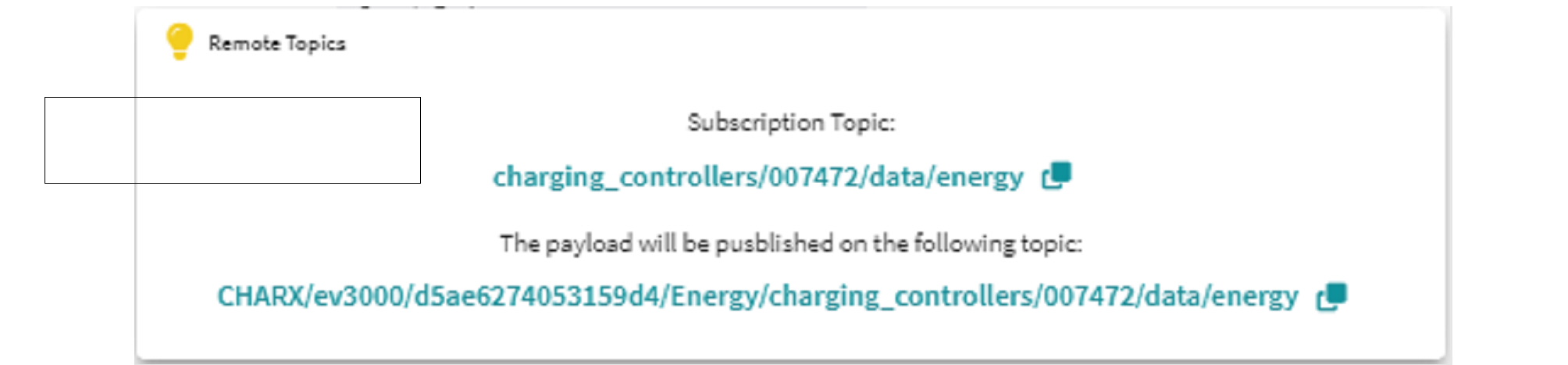
Information button | Opens a pop-up window that displays the topic under which the forwarded topic is published. The charging controller automatically adds the hierarchy <Prefix>, <Device type>, <Device ID> to the topic. You can copy the entire topic to the clipboard and use it for configuring the remote MQTT broker (“Information pop-up for forwarding topics from the MQTT bridge to the local MQTT broker” on page 127). |
Button | |
SAVE | Saves the current topic forwarding configuration |
ADD ROW | Adds another row in which MQTT topics for forwarding can be entered |
Figure 5-34Information pop-up for forwarding topics from the MQTT bridge to the local MQTT broker
Figure 5-35Information pop-up for forwarding topics from the MQTT bridge to the remote MQTT broker